

Software-Defined Data Center (SDDC) – Components and Benefits
Infrastructure Managed Services

The enterprise IT sector is experiencing an era of change with the use of the software-defined data center (SDDC). Physical infrastructure was once the domain of “wires and pliers” technicians; with SDDC, if you want to deploy data center assets, it is seemingly as easy as pressing a button and an interconnected collection of software does the rest.
The SDDC works by virtualizing compute, storage, and networking, the three core elements of a data center. Management takes place through a centralized platform. They’re popular, too. More than 60% of enterprises have SDDCs or plan to deploy them. And It’s a big business, currently valued at $74 billion, but on track to grow at a rate of 17% a year.
This article explores the state of the SDDC, discusses SDDC benefits, and presents some of the challenges inherent in SDDC implementation.
Fact Snippet:
- Software-Defined Data Center Definition – A Software-Defined Data Center (SDDC) is a data center model in which every infrastructure component—compute, storage, networking, and security—is virtualized and abstracted away from the physical hardware, then delivered and managed as software-based services.
Jump-to Section
What is a Software-Defined Data Center?
Software-Defined Data Center Architecture
Software-defined compute (SDC)
Software-defined storage (SDS)
Software-defined network (SDN)
9 Software-Defined Data Center Benefits
Comparisons Between SDCCs and the Cloud
Software-Defined Data Center vs Cloud
Software-Defined Data Center vs Private Cloud
What Does the Future Hold for Software-Defined Data Centers?
What is a Software-Defined Data Center?
A software-defined data center is an approach to data center management where infrastructure elements such as compute, storage, and network are virtualized, abstracted from physical devices and managed through software.
The SDDC stands in contrast to a traditional data center, in which IT admins and technicians manage individual physical components manually. For example, installing and deploying a server by hand on a data center rack. Instead, the SDDC separates and virtualizes such resources from their physical infrastructure and enables their management through a unified software interface.
Software-Defined Data Center Architecture
To understand the SDDC, it is useful to start by defining the software-defined data center components and the overall SDDC architecture. While variations are common, most SDDCs have a central SDDC management platform running atop software-defined compute (SDC), software-defined storage (SDS), and software-defined network (SDN).
These virtualization layers are integrated in the SDDC to form a unified, hyperconverged infrastructure. The SDDC can thus deliver IT resources as services no matter where the underlying physical devices are located. They could be in a private cloud, public cloud, on-premises, or in a hybrid cloud.
With a single control interface, a data center admin can deploy, manage, or switch off the key elements of a data center. For example, to spin up a Windows Server with a storage array, connected to a dedicated network segment.
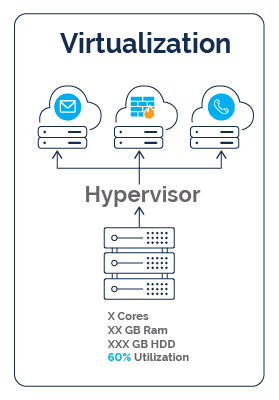
“Software-defined” means virtualized. Therefore the data center admin controls the virtualized data center asset using code. It’s important to distinguish between virtualization as a general principle and virtualization as it’s applied in the SDDC. Data center virtualization refers to running multiple instances of a computer, storage volume, or network function on a single piece of hardware. A virtual machine (VM) is an example of simple virtualization. However, a VM on its own does not create an SDDC. Rather, the SDDC brings unified management to a varied collection of VMs.
If you have ever worked with server and storage on Microsoft Azure, you have experienced this complete virtualization in action. By clicking on buttons in the Azure interface, you can completely control the creation and configuration of a virtual server. All SDDCs work this way, even if the specifics of the infrastructure and interface differ from one instance to another.
Let’s investigate core components of a SDDC:
Software-Defined Compute (SDC)
Software-defined compute uses virtualization software to turn physical compute resources like CPUs and random access memory (RAM) into VMs or containers that are easy to provision and manage.
Using hypervisors at the machine level, SDC makes it possible to run servers with different configurations on the same physical device, e.g., Windows and Linux operating systems on the same X86 box. The SDDC admin does not know, and does not need to know, which physical device is in use. The new generation of hypervisors and centralized orchestration platforms, such as Kubernetes, allow for automation in resource allocation and scaling in an SDDC.
Software-Defined Storage (SDS)
Software-defined storage for a software-defined data center works by pooling the storage resources of multiple devices and presenting the SDDC admin with unified storage capacity.
For example, an SDDC might have SDS comprising dozens of virtualized solid-state drives (SSDs). SDS can potentially work with multiple storage types, including block storage, object storage, and file storage. It may let admins distribute data across public cloud, private cloud, and on-premises storage environments.
Software-Defined Network (SDN)
Software-defined networking data center instances abstract the network control plane from its physical network hardware by means of a centralized controller. The result is a network architecture featuring two layers: 1) A control plane, with SDN controllers that manage flow control and data about the network’s operations and performance; and 2) The data plane, with physical or virtual switches/routers that move network traffic based on instructions from the controller.
The data plane may also contain other virtualized network functions (VNFs), such as virtual firewalls and virtual load balancers. With this structure, a SDN is able to centralize network control and let administrators manage network traffic and resources programmatically, which improves efficiency and flexibility
SDDC Management Platform
The SDDC operates through a management platform. Enterprises have a range of choices for this technology, with vendors like VMware and Red Hat, along with cloud platforms such as Azure providing extensive SDDC management features.
Most SDDC management platforms offer the following functionality:
- A centralized control plane, i.e., a single interface that allows admins to monitor and manage all of the SDDC’s virtual infrastructure, including SDC, SDS, and SDN.
- Automation and orchestration, which uses APIs to facilitate automation of IT infrastructure components, such as virtual asset provisioning, lifecycle management, and policy enforcement.
9 Software-Defined Data Center Benefits
The benefits of software-defined data center are many. The architecture solves a number of problems that have long affected data center efficiency, performance, and cost. Here are 9 advantages of a software-defined data center:
-
Versatility and agility — It is possible to set up or modify infrastructure configurations rapidly in an SDDC. For example, if an enterprise needs to deploy compute and storage for data analytics workloads, that process will be faster and more administratively efficient than is possible with manual implementation in a conventional data center.
Standing up the analytics infrastructure might take less than a day in an SDDC, versus weeks or months in a traditional environment. This makes SDDCs versatile, able to handle use in different industries. Policy-driven automation can make provisioning even faster.
- Improved infrastructure performance — An SDDC makes it relatively easy to optimize compute, storage, and networking for a given workload. For example, easily moving a processing-intensive workload like artificial intelligence (AI) to machines with fast graphical processing units (GPUs).
- Reduced storage overhead — With SDDC, it is possible to distribute data to storage volumes across on-premises and cloud environments, enabling optimized utilization of storage resources. Such dynamic allocation of resources based on workload and performance requirements is made possible by Intelligent, policy-driven management.
- Data durability and security — By allowing for streamlined data distribution and replication across multiple environments, the SDDC keeps data accessible and protected against data center outages.
- Optimized traffic flow — By provisioning network resources dynamically to meet real-time demands, the SDDC optimizes traffic flow and speeds up data transfer.
- Self-healing networks — An SDN can automatically reconfigure itself in response to changes in traffic or workload requirements, resulting in a self-healing capability that reduces network downtime protecting network data loss.
- Increased network security — SDNs make it relatively simple to set up network segments, including microsegments that protect digital assets from attackers that move laterally across networks.
-
Financial gains — By pooling resources, an SDDC facilitates better infrastructure utilization, which enhances return on assets (ROA). Pooling also leads to fewer unnecessary purchases of equipment, because SDDC software is optimizing the hardware more efficiently.
The bigger financial picture is also improved. Utilizing SDDC software can also lower the overhead of managing an environment, allowing smaller teams to do more, or potentially even manage a larger infrastructure instance.
- Stronger potential for modernization — Adopting the SDDC models should involve standardizing the data center on a single management platform, which makes it easier to integrate new technologies and migrate workloads to the cloud.
Challenges with SDDCs
SDDCs come with their share of challenges. The setup process can be difficult, particularly if the SDDC is absorbing legacy systems or spanning multiple clouds. The virtualized resources that comprise the SDDC typically come from different suppliers. Not all components will be equally well-suited to virtualization and centralized management. Integration and interoperability can take work to achieve.
SDDCs can introduce complexity, as well, especially if they span multiple public and private cloud environments. Without the right tools at the management layer, that complexity can cause unexpected disruptions and security risk exposure.
There is also the risk of giving away control and predictability of finances. The software licenses that come from SDDCs are typically subscription-based and that gives more power to the organization granting the license (think of Broadcom’s price hike of VMware licenses). Essentially if/when software licensees want to increase subscription costs, the end-user usually won’t be able to pivot fast enough to avoid huge prices increases.

Comparisons Between SDCCs and the Cloud
The SDDC and the cloud are related but different paradigms. They overlap to the extent that a cloud data center is software-defined. Doing a private cloud vs software-defined data center comparison, as well as a comparison between a public cloud platform and an SDDC, reveals a number of significant differences.
Software-Defined Data Center vs Cloud
The SDDC offers an alternative way to manage infrastructure. A public cloud platform, in contrast, is a vehicle for delivering cloud services, i.e., enabling a cloud software architecture.
A public cloud platform is also a business, while an SDDC is usually an internal operation. SDDC capacity is typically limited by physical hardware availability. Public cloud provides essentially infinite scalability. Both offer improvements in agility and efficiency through virtualization, so people sometimes conflate the two ideas.
Software-Defined Data Center vs Private Cloud
The SDDC and private cloud are closely related ideas, but with some differences. It’s even possible that a private cloud could be hosted in an SDDC. This potential highlights how they are not the same.
A private cloud is a platform for deploying cloud software architecture in a privately owned or co-located hosting site. A private cloud runs on a cloud computing platform like Red Hat OpenStack or OpenMetal. These are not SDDC platforms, but rather programs that enable users to build systems using the cloud model. Use cases include dynamically provisioning servers, databases, and applications on demand through a unified management interface. An SDDC does not offer these capabilities on its own.
What Does the Future Hold for Software-Defined Data Centers?
The SDDC is not a static idea. The model is constantly evolving to keep up with changes in IT and the use of technology in general. Factors affecting the future of the SDDC include:
- Increased use of AI — AI creates unique load and performance requirements that SDDCs must support.
- Mobility and edge computing — Mobile device proliferation and expansion of the internet of things (IoT) push the SDDC to adapt to more distributed computing models.
- Agentic AI — As AI agents get embedded in more applications, workload requirements will become more unpredictable, e.g., applications using built-in agents to invoke services in different patterns from existing patterns. SDDC should support these variable load patterns.
- Cloud evolution — More sophisticated hybrid and multi-cloud architectures will affect how SDDCs are designed and operate. For example, they will have to support complex integration and data portability between cloud platforms.
Utilize PPT to Help with your SDDC
If you’re looking to introduce a SDDC to your IT infrastructure, or already have a software-defined data center established, Park Place can help.
We can manage and monitor your software applications through our IT infrastructure managed services offering. This means we take care of the day-to-day management of your equipment’s performance, leaving you to focus on the projects that really matter. Remember, physical hardware is still necessary to run a SDDC. Park Place can be on hand to maintain your physical data center equipment with our third-party maintenance service, where we have been the global leader for 35+ years.
Of course there’s then software. Our third-party software support service provides all the technical assistance you need for your software versions, from VMware support, Microsoft Unified Support and everything in between. Finally, are you looking for help with setup and implementation of a software-defined data center? Our IT Professional Services team can help with all your installation needs.
Contact us to learn more.
Frequently Asked Questions:
-
What is SDDC?
SDDC stands for Software-Defined Data Center. It's an IT architecture where all infrastructure, including compute, storage, networking, and security, is virtualized and delivered as software.