

Direct-to-Chip Cooling – How it Works and its Effectiveness
Liquid Cooling

Modern data center workloads like artificial intelligence (AI) and data analytics tend to heat up digital hardware. With CPUs and GPUs cranked up to their “boost” speeds, the need for efficient cooling is acute. Direct-to-Chip cooling offers an effective, energy-efficient solution.
By directly cooling the processor, the computer element that generates the most heat, direct-to-chip liquid cooling enables high-performance computing workloads to run without risk of overheating. This article examines how such direct liquid cooling data center solutions work, the benefits of adopting them, and some challenges that can arise with their implementation.
Jump-to Section
What is Direct-to-Chip Cooling?
How Does Direct-to-Chip Cooling Work?
Components Involved in Direct-to-Chip Cooling Systems
What are the Different Types of Direct Cooling Technology?
Single-Phase Direct-to-Chip Cooling
Two-Phase Direct-to-Chip Cooling
7 Advantages of Direct-to-Chip Liquid Cooling
4. Optimized Data Center Space
5. A Quieter and Better Work Environment
7. Support for High Thermal Design Power
10 Considerations for Implementing a Direct Liquid Cooling System
Is Direct-to-Chip Better than Immersion Cooling?
Direct Liquid Cooling Data Center Services from Park Place Technologies
What is Direct-to-Chip Cooling?
Direct-to-chip cooling is a form of liquid cooling that reduces the heat generated by a microprocessor by running a flow of liquid coolant directly on the surface of the microprocessor.
The cooling is highly conductive for heat, but has low conductivity for electricity. This way, if the coolant leaks, it will not cause the processing chip to fail. Such direct contact liquid cooling has several advantages over air cooling, because liquids are more efficient conductors of heat than air.
How Does Direct-to-Chip Cooling Work?
Direct liquid cooling involves the placement of a direct-to-chip cold plate that provides a flow channel for a dielectric fluid, a chemical created specifically for direct-to-chip cooling data center functions.
The direct-to-chip cooling cold plate touches the surface of the chip it is cooling. The direct liquid cooling technology makes the coolant pass through the plate, drawing heat from the chip in the process. The plate is made from a thermal interface material. It is designed to conduct heat from the chip to the cold plate.
Components Involved in Direct-to-Chip Cooling Systems
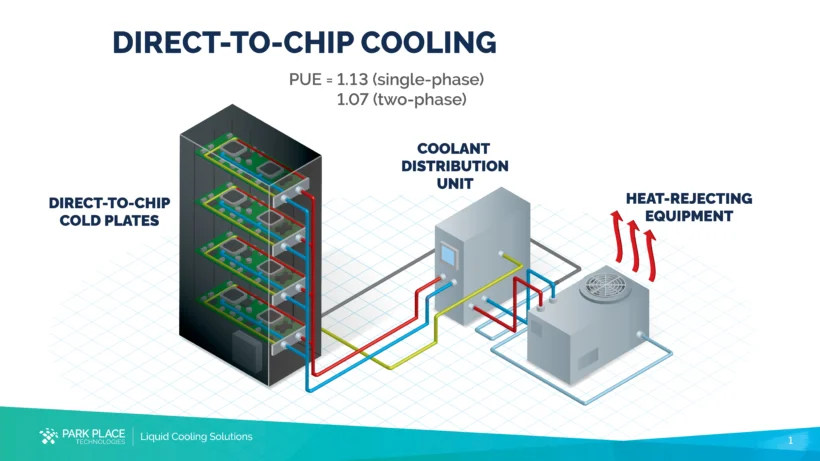
Liquid cooling direct-to-chip requires a number of functional elements to work properly. This includes a circulator/pump, a device that pumps the coolant through the system. The circulator moves the coolant to a heat exchanger, which dissipates the heat accumulated by the coolant through its contact with the chip.
From there, the liquid moves back to the pump, which sends it to cool off the heat-producing chips (GPUs and CPUs). The direct-to-chip cooling diagram below offers a simplified view of the chip cooling technology and how its component parts work together to achieve data center direct-to-chip cooling.
What are the Different Types of Direct Liquid Cooling Technology?
There are two modes of delivering cooling chip technology. One is to provide chip cooling through a “Single-Phase” and the other is “Two-Phase” liquid-to-chip cooling. Each has its pros and cons.
Single-Phase Direct-to-Chip Cooling
Single-Phase direct-to-chip refers to the system shown in the figure above. A pump pushes coolant through a closed loop system. After warming up on the cold plate, the coolant flows to a heat exchanger before cycling through the system again.
This approach is relatively simple. It can be more economical than the two-phase approach. However, with its reliance on pumps, which can fail, there is the risk of unexpected overheating. There is also the risk of leakage throughout the system, which can damage equipment and cause other problems in a data center.
Two-Phase Direct-to-Chip Cooling
Two-phase Direct-to-Chip Cooling works differently. A Two-Phase Direct-to-Chip cooling system places the chip into a bath of dielectric fluid, which boils from the chip’s heat. The resulting vapor rises inside the system, condensing back to fluid form in condenser tubes before flowing again past the heat-generating elements. It’s an endless passive cooling loop that enables continuous cooling.
This type of direct liquid cooling system offers several advantages over the Single-Phase approach. Its heat absorption capacity is greater, so it works well in high-density environments. No pumps are needed, creating a system with fewer points of failure.
That said, Two-Phase cooling is more complex to manage. Dielectric fluids tend to be expensive and challenging to manage. Overall, two-phase systems also cost more than single-phase to set up and maintain.
7 Advantages of Direct-to-Chip Liquid Cooling
Direct liquid cooling server systems and direct liquid cooling data center solutions offer a number of advantages over the predominant air-based cooling systems and indirect liquid cooling systems that cool at the rack level. Here are seven to consider:
1. More Efficient Cooling
Direct-to-Chip cooling can be up to 1000 times more efficient than air cooling. This is because cooling chips enable a more efficient heat transfer than is possible by blowing cold air through server racks.
With air cooling, a lot of the air passes over components, such as outlying parts of mainboards, that are not major sources of heat production. Therefore, some of the cooled air can be wasteful.
2. Energy Savings
Direct cooling of chips drives a reduction in energy consumption. Reductions can be from 25 to 30%. This savings occurs due to Direct-to-Chip’s greater efficiency versus air cooling. The lower energy requirements mean lower data center operating costs.
The diagram below shows the efficiency of direct-to-chip cooling compared to air cooling, in terms of wattage usage.

3. Better performance
Heat affects a microprocessor’s performance potential. If a chip is running too hot, that will trigger “thermal throttling,” which slows the processor’s clock speed down to avoid overheating.
For this reason, well-cooled chips can achieve and sustain stronger performance, which is needed for workloads like AI and data analytics. Avoiding overheating also serves to extend the chip’s lifespan.
4. Optimized Data Center Space
With direct contact liquid cooling, it is possible to deploy more servers in a rack, improving compute density. Air cooling is not only less able to cool a dense server rack, it also requires space between servers for air flow.
Direct-to-Chip thus enables optimized use of data center space. With data centers costing millions or billions to build, better space utilization contributes to return on investment (ROI) for the data center.
5. A Quieter and Better Work Environment
This may not seem like a significant issue, but traditional air-cooled data centers are notoriously noisy and they’re often also uncomfortably cold. Both of these facts affect employee well-being and morale. Direct liquid cooling technology makes possible a quieter, more temperate work environment.
6. Less Environmental Impact
Direct-to-Chip’s lower energy consumption shrinks a data center’s environmental impact and carbon footprint. This supports sustainability goals and helps the data center comply with regulations like the EU’s Energy Efficiency Directive (EED) or corporate/industry standards.
7. Support for High Thermal Design Power
With Direct-to-Chip cooling, it is possible to run chips at a high level of Thermal Design Power (TDP). TDP defines the maximum amount of heat that a CPU or GPU can dissipate while running in standard, high-load mode.
With air cooling, the TDP is typically in the range of 200 to 300 Watts per chip, versus thousands of watts with Direct-to-Chip.
10 Considerations for Implementing a Direct Liquid Cooling System
Direct-to-Chip cooling comes with its share of challenges and limitations. Done well, it can be an amazing technology to realize high-performance computing outcomes. However, getting Direct-to-Chip right takes focus and the implementation of best practices.
Direct-to-Chip is not always the best choice for certain kinds of environments. Here are 10 considerations for implementing a direct-to-chip cooling approach.
-
Take a long-term, requirements-based approach—Unlike air conditioning in a data center, which is familiar and relatively simple to install and maintain, direct-to-chip liquid cooling is more of a project. It’s necessary to gather requirements, such as “thermal footprint” objectives, and plan the Direct-to-Chip specifics accordingly.
It’s helpful to take a long-term approach, considering factors such as future scalability and changes in workload, which could affect the Direct-to-Chip deployment. For example, if a set of servers is going to switch from data analytics to media streaming, that could change the assumptions about heat generation and cooling needs.
-
Get the bigger picture—Direct-to-Chip liquid cooling tends to leave other heat-generating components uncooled. Hard disk drives and network switches, for example, can run hot if they don’t have a cooling solution focused on them. For this reason, Direct-to-Chip usually involves a hybrid of air cooling and Direct-to-Chip, which may limit density. Or, immersion cooling, which cools everything, might be preferable.
System compatibility is an issue to resolve before moving forward with direct liquid cooling, as every server is compatible with Direct-to-Chip. For instance, can a cold plate attach to liquid cooling solutions and the chip itself? Does the data center’s layout support the required plumbing?
- Don’t ignore cost factors— When comparing liquid cooling vs air cooling in data centers, air-based systems are invariably less expensive to acquire and deploy than Direct-to-Chip solutions. However direct-to-chip may also require more costly specialized skillsets from data center employees or external support contractors.
- Understand the full environmental impact—The coolants used in Direct-to-Chip may not be good for the environment. Understand the implications of leaks, as well as storage and disposal. There could be regulatory and workplace safety considerations. It may be necessary to contract with a specialized firm to handle them.
- Design for redundancy—For critical workloads, it is worth implementing backup data center cooling systems or, at least, a replacement pump and equivalent parts on hand for rapid restoration of service.
- Select the right coolant—You have choices when it comes to Direct-to-Chip coolants. The right one will meet your specific thermal conductivity and electrical conductivity requirements. Given environmental and safety concerns, as well as potential damage to equipment, non-corrosive coolants are generally better.
- Prepare for leaks—Leaks happen. While a leak may not be a huge threat to IT equipment, it can still be a messy, potentially harmful situation to handle. It’s wise to invest in leak detection systems and prepare a response to deal with the leak quickly. Cooling will cease during the leak, too, so it pays to be ready to react.
- Don’t neglect the pump—Not all Direct-to-Chip cooling pumps are equally suited to a given cooling setup. Flow rates differ, as does the range of pumping capacity. This can affect scalability. Also, pay attention to pump maintenance, given the disruptions that can occur with a direct-to-chip system pump failure.
- Know your heat exchanger—You should have sufficient capacity to handle your system’s thermal load.
- Monitor and maintain—It’s a best practice to monitor a direct liquid cooling system continuously, tracking levels of coolant, temperatures, and so forth. Some solutions automate this process. And, it’s wise to set up a regular data center maintenance schedule with pre-scheduled service visits.
Is Direct-to-Chip Better than Immersion Cooling?
Infrastructure managers may wish to know how direct-to-chip cooling compares to immersion cooling systems, which involves immersing the entire piece of equipment in a chilled bath of coolant.
When comparing direct-to-chip vs immersion cooling, it is not so much about what approach is “better,” but rather suitability for a given use case. The choice should depend on the specifics of the workload, compatibility with infrastructure, the data center’s thermal characteristics, and cost.
Direct-to-Chip is precise and targeted, which makes it appropriate for high-density systems. It tends to be easier to integrate into data centers than immersive cooling.
In contrast, immersion cooling offers a uniform cooling capability for high-performance workloads. It enables even greater server density than Direct-to-Chip. However, immersion cooling represents a bigger investment of money and skills development. It requires custom hardware that may trigger changes in infrastructure. When comparing the two operators need to be mindful of how one approach can be preferable over the other.
Direct Liquid Cooling Data Center Services from Park Place Technologies
When it comes to data center liquid cooling services, Park Place Technologies is your ideal partner. We ensure a cost-effective and impactful Direct-to-Chip cooling solution, from installation to continual performance.
Overcome modern day IT infrastructure challenges – from rising energy demands driven by AI, to the increasing need of improving sustainable data center operations — with the expertise of our dedicated liquid cooling engineering team.
Contact us today to learn more.
Frequently Asked Questions:
-
What is direct liquid cooling?
Direct liquid cooling (DLC) is a method of cooling electronic components—such as CPUs, GPUs, or servers—by circulating liquid (usually water or dielectric fluid) through cold plates that make direct contact with the heat-generating surfaces. Direct liquid cooling and direct-to-chip cooling are the same thing.
-
Is direct liquid cooling better than immersion cooling?
Direct-to-Chip is not necessarily better than Immersion Cooling. The right choice will depend on the specific thermal profile of the workload, as well as factors like budget, need to modify infrastructure.
-
What is the difference between direct vs indirect liquid cooling in data centers?
Direct liquid cooling puts coolant into physical contact with microprocessors through cold plates. In contrast, indirect flows coolant through the entire rack, cooling a greater area, but with less cooling capability at the level of the chip, which is usually the greatest heat generating element in the server.